An export format is a handoff decision, not a measure of transcript quality. The same reviewed recording may need a readable document for an editor, rows for an operations team, structured data for a developer, or timed cues for a subtitle editor. VoiceCut supports TXT, Markdown, JSON, DOCX, XLSX, SRT, and VTT. Each carries a different view of the result, so choose after you know who will open the file and what they must do next.
Choose for the next task, not the file extension
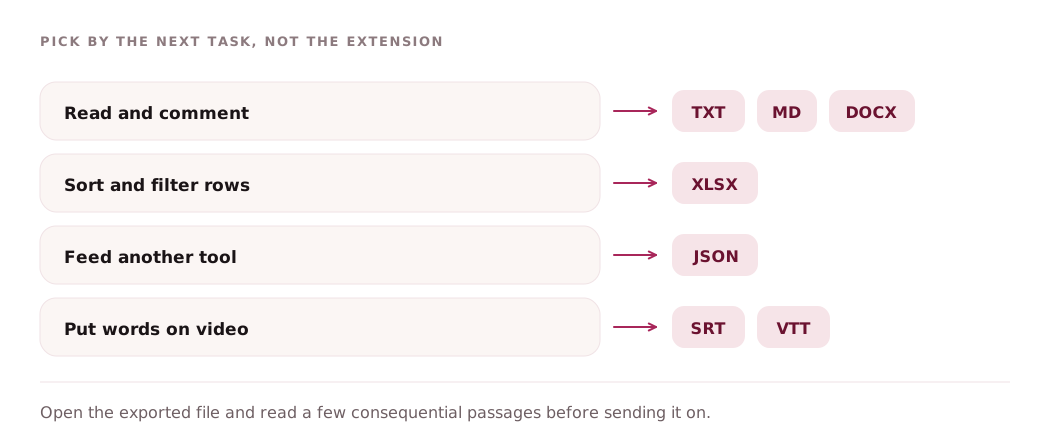
Begin with the recipient. If they need to read and comment, a document or simple text file is usually easier than a data structure. If they need to sort segments or inspect confidence values, use a spreadsheet. If software must retain segment fields and annotation status, use JSON. If a video platform or subtitle editor needs timed cues, use SRT or WebVTT.
Review the transcript before generating the final handoff. A different extension does not correct a name, confirm a speaker, or turn a draft outcome into a verified fact. Open the exported file and inspect a few consequential passages, because the useful question is not whether the export completed but whether the chosen representation preserved what the recipient needs.
- Reading and light editing: TXT, Markdown, or DOCX.
- Filtering and row-based review: XLSX.
- Structured integration: JSON.
- Timed subtitle handoff: SRT or VTT.
Use TXT or Markdown for portable text
TXT is the simplest readable export. VoiceCut writes transcript blocks with a start time, speaker label, and segment text. When a current result document is available, the file can also place its sections before the complete transcript. TXT opens almost anywhere and is useful for search, editorial cleanup, archiving, or moving checked wording into another writing tool without document styling.
Markdown mirrors the TXT layout with headings, bold timestamp-and-speaker lines, and quoted evidence labels for result sections when those sections are current. It suits repositories, note systems, static-site tools, and editors that understand Markdown. Although Markdown is supported as an export format, it is not one of the profile-specific recommendations in the current fallback profile list, so choose it deliberately when that workflow expects Markdown.
- Choose TXT for maximum compatibility and minimal formatting.
- Choose Markdown when headings and plain-text structure should survive in a Markdown-aware tool.
- Do not expect either format to behave like a database or subtitle timeline.
Use JSON when structure matters
JSON preserves the structured transcript payload rather than flattening everything into prose. It is the best fit when another program needs segment identifiers, start and end times, speaker labels, text, confidence values, language data, result-document fields, or annotation state. Developers can parse those fields without trying to recover them from visual formatting in a document.
Structured does not mean automatically approved. An annotation status may indicate that analysis needs a refresh, and summaries, decisions, or actions can still be drafts that require human review. Build downstream logic around the fields and statuses actually present in the file. Keep the recording and revision context available when a consumer must trace an important statement back to source audio.
- Choose JSON for integrations, audit tooling, or custom transformations.
- Read annotation and refresh state instead of assuming every optional field is ready.
- Do not present machine-produced outcomes as confirmed decisions without review.
Use DOCX or XLSX for human handoffs
DOCX provides a conventional document with a title, available result sections, and the transcript in timestamped speaker blocks. It works well for an editor, interviewer, lecturer, or colleague who wants to read and comment in a word processor. XLSX provides a Transcript sheet with segment, start, end, speaker, text, confidence, and language columns; when current result sections are available, it can also include a separate Result sheet.
Meeting analysis deserves a specific caveat. Summaries, decisions, and action annotations may arrive later than the base transcript, and those late analysis annotations are not guaranteed to appear in DOCX, XLSX, or TXT. Check the current result in VoiceCut and inspect the exported file before distributing meeting notes. If a downstream process needs structured annotation state, JSON is the safer format to evaluate rather than assuming a document export contains every late update.
- Choose DOCX for reading, comments, and conventional editorial delivery.
- Choose XLSX for filtering, sorting, or reviewing one segment per row.
- Verify meeting summaries, decisions, and actions in the actual export before sharing.
Use SRT or VTT for subtitle cues
SRT and WebVTT turn every transcript segment into a timed cue. SRT uses numbered cues and comma-separated millisecond timing; VTT begins with a WEBVTT header and uses full-stop millisecond timing. In both files, VoiceCut includes the speaker label with the segment text. These formats are designed for players, video platforms, and subtitle tools rather than long-form reading.
Cue timing comes from the fixed start and end boundaries of transcript segments. Those boundaries are not editable in VoiceCut, so the export is a useful starting point, not a promise of final subtitle timing or line breaks. Review the cues with the video, then use a dedicated subtitle editor when you need to retime, split, merge, or reflow them. Choose VTT where the destination asks for WebVTT; choose SRT for workflows that explicitly accept SRT.
- Check every cue against picture and sound after export.
- Expect segment-based timing, not manually authored caption boundaries.
- Retiming and cue restructuring belong in a subtitle editor after export.
Match the profile recommendation to its limits
The current profile recommendations are specific: Exact transcript uses TXT, DOCX, and JSON; Meeting minutes uses DOCX, XLSX, and TXT; Interview uses DOCX, TXT, and JSON; Lecture notes uses DOCX, TXT, and JSON; Subtitles uses SRT, VTT, and TXT; Call analysis uses DOCX, XLSX, and JSON. These are practical defaults, not restrictions on careful review.
Read profile outputs literally. Lecture chapters are numbered, balanced groups that cover the recording in order; they are not semantic topic titles. In call analysis, question candidates and risk or objection candidates are collected as separate sets, not paired records. For meetings, verify whether late analysis is present before relying on a document export. For subtitles, plan to review fixed segment timings elsewhere. The right export is the one whose known structure matches the next task.
- Interview or lecture handoff: start with DOCX or TXT; use JSON for structured processing.
- Meeting or call row review: consider XLSX, then inspect which result sections are actually present.
- Subtitle handoff: start with SRT or VTT and schedule a separate timing review.
Create a transcript and choose its export format
New accounts receive 30 trial minutes. No payment card is required.