
A generated meeting summary can shorten the distance between a long conversation and a usable record, but it cannot approve its own interpretation. A compact sentence may omit a condition, merge two speakers’ views, or make an open proposal sound settled. The safest review starts with the source: compare the draft with the transcript, return to the recording when wording matters, and ask a person to confirm every consequential decision and action before the record is shared.
Treat every analysis item as a working draft
In VoiceCut Studio, the summary, decision, and action annotations are drafts. They are useful starting points for review, not approved minutes and not proof that everyone accepted the same interpretation. Keep that status visible in your process. A reviewer should be able to distinguish generated wording from wording that a meeting owner has checked and approved.
The current Studio summary list does not link each item straight to its supporting moment in the transcript or recording. Reviewers therefore need to keep the transcript and player open, locate the relevant passage, and record the useful timestamp themselves. Do not approve an item merely because it appears concise or plausible in the list.
Set a simple rule before review begins: no summary claim becomes final until the source supports it, and no decision or action becomes assigned until a person confirms it. This prevents editorial polish from being mistaken for agreement.
- Label the working copy as a draft and name the person responsible for approval.
- Separate source wording, reviewer notes, and final wording so changes remain understandable.
- Keep unresolved items visible instead of silently smoothing them into the summary.
Prepare the transcript, recording, and meeting context
Open the original recording beside the Studio transcript. The transcript helps you search and navigate; the recording remains the source for tone, overlap, emphasis, and words that may have been recognised incorrectly. Note the meeting date, purpose, agenda, and expected participants before checking individual summary lines.
Create a small context sheet for names, roles, project terms, dates, and agenda items. Speaker labels can help you follow changes of voice, but a label alone does not establish a person’s identity. Confirm attribution from introductions, the meeting invitation, trusted participant records, or a person who attended. If identity is unresolved, retain a neutral label in your notes rather than guessing.
Decide what deserves the closest review. A casual recap may tolerate less detail than a governance record, client commitment, hiring decision, or deadline that will enter another system. Prioritise statements with operational, financial, legal, or reputational consequences.
- List names, specialised terms, numbers, and dates likely to be misheard.
- Mark agenda items that were postponed, contested, or discussed out of order.
- Choose who can resolve ambiguities when the recording is not enough.
Check each summary sentence against its full passage
Review one summary sentence at a time. Search the transcript for its distinctive terms, then read enough before and after the match to understand the exchange. If the wording will affect a decision, commitment, or public statement, listen to the corresponding recording as well. A transcript match shows where to listen; it does not settle the interpretation by itself.
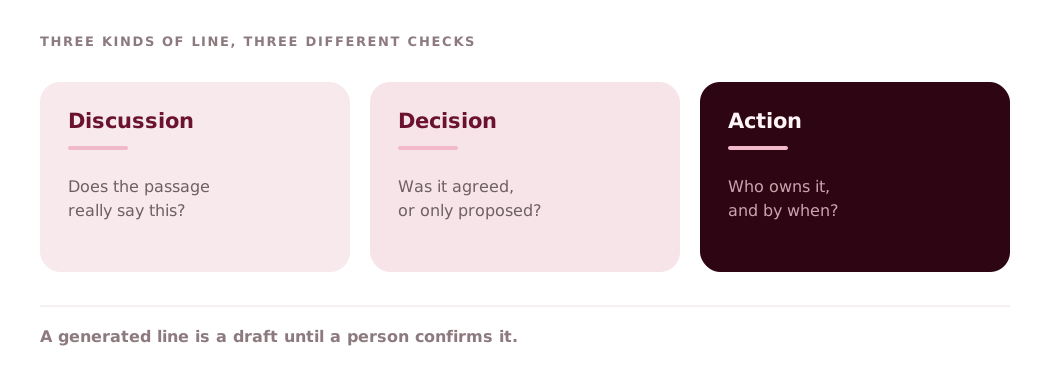
Ask three questions. Does the draft identify what was actually discussed? Does it preserve qualifications such as only if, not yet, or subject to review? Does it represent the balance of the conversation rather than the clearest single sentence? A good summary can compress repetition, but it must not erase disagreement, uncertainty, or scope.
Watch for combined claims. A sentence such as the team approved the launch date and budget may blend two separate exchanges, one settled and one still open. Split the sentence when the source supports different statuses. If a topic was mentioned without an outcome, describe it as discussion rather than manufacturing a conclusion.
- Keep conditions and exceptions attached to the claim they limit.
- Distinguish a participant’s opinion from the group’s conclusion.
- Add a timestamp to the review note for every corrected or disputed item.
Verify decisions separately from discussion
A decision needs more than a confident sentence. Find the passage where options narrowed or a participant with authority confirmed the outcome. Check exactly what was decided, what remains outside scope, when the decision takes effect, and whether any condition must be met first. Silence after a proposal is not necessarily agreement.
Compare the decision annotation with both the surrounding transcript and the recording. If one participant objects, asks for more information, or says the choice is provisional, preserve that status. Use wording such as proposed, pending approval, or no decision recorded when that is what the source supports.
For each accepted decision, record the reviewer, confirmation date, and supporting timestamp in your working document. If your organisation requires approval from a chair, project owner, or client, obtain it before distributing the item as final. VoiceCut can provide a draft for review; organisational authority still comes from people.
- Confirm the decision itself, its scope, and any conditions.
- Record dissent or unresolved alternatives when they matter to later work.
- Do not infer consensus from a change of topic or the end of the call.
Confirm actions, owners, and dates with a person
Review action annotations independently from the summary. First establish that the speaker made a commitment rather than suggested an option. Then confirm the deliverable, the responsible person or team, and the due date. A phrase such as we should review this next week does not identify an owner, while I will send the draft on Tuesday does.
Do not fill a missing owner or deadline from habit. Mark the field as unresolved and ask the meeting owner or participant. If the recording contains two dates, determine whether one is a checkpoint and the other is final delivery. Preserve dependencies such as approval, access, or input from another team.
Before actions move into a task tracker, send the short list to the named owners or the meeting owner for confirmation. That human check catches attribution problems and converts a draft annotation into an accountable commitment. Keep rejected or superseded actions out of the final list, but retain a note of the correction if an audit trail matters.
- Use one action per line with a clear deliverable.
- Confirm owner, due date, dependency, and approval status separately.
- Leave unknown details unresolved rather than completing them from assumption.
Resolve gaps, approve the record, and export carefully
Maintain a short review log with the draft item, the relevant timestamp, the corrected wording, and the person who resolved it. For noisy, overlapping, or consequential passages, ask a second listener to check without first showing them your preferred interpretation. Escalate unresolved wording to a participant instead of forcing certainty from poor audio.
When the summary, decisions, and actions have been checked, give the record a version and approval state. Share the final wording together with any open questions, not a mixture of approved items and silent assumptions. If the record changes after participant feedback, update the version and preserve who approved the revision.
DOCX, XLSX, and TXT downloads are transcript exports. Use them when you need a portable copy of the transcript for review or filing, but do not assume that later Studio analysis annotations will be present in those files. If the reviewed summary, decisions, and actions must travel outside Studio, copy them into your approved meeting-record template and check that document against the final review log before sending it.
- Open the chosen transcript export and spot-check critical passages.
- Keep the approved meeting record distinct from the raw transcript export.
- Store the recording, transcript, review log, and approval according to your retention policy.
Review a meeting recording in VoiceCut
New accounts receive 30 trial minutes. No payment card is required.